Q/LES: Mobile LIMS
With Q/LES, you can digitize your laboratory processes directly at the workstation - real-time data acquisition, digital SOPs, barcode/QR scanning and offline functionality make the paperless laboratory a reality.
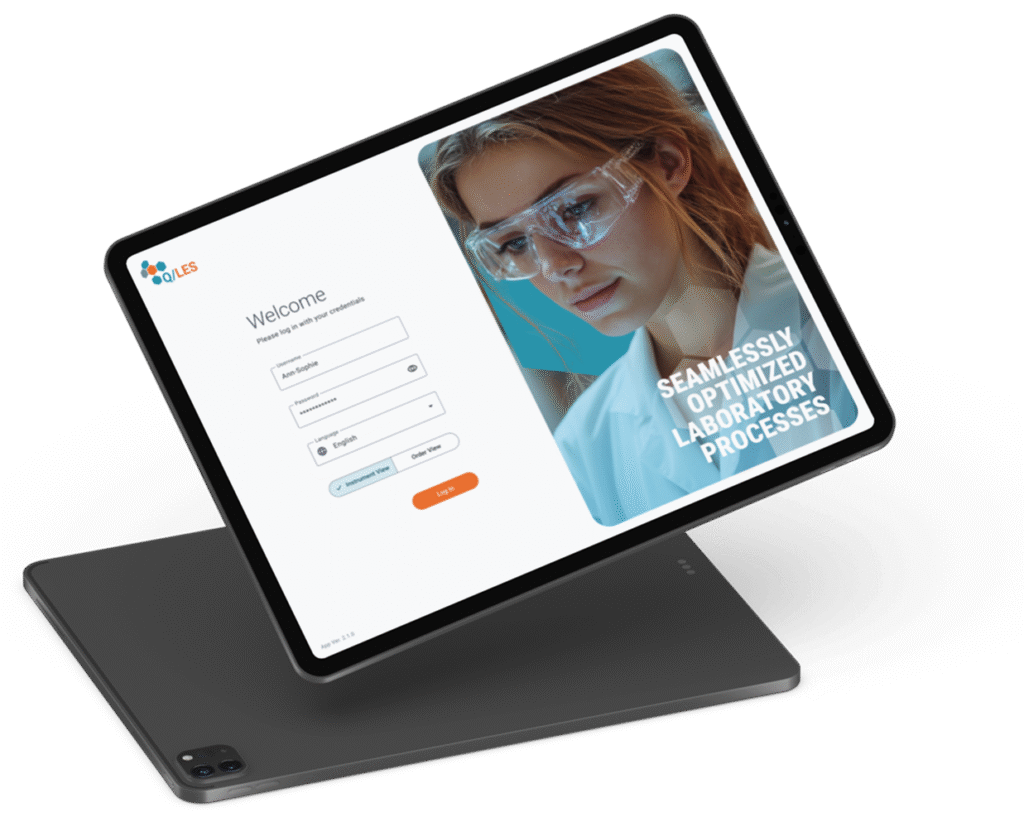
The Q/LES app - your digital laboratory assistant
In many laboratories, stacks of paper and printed work instructions are still part of everyday life. But in an increasingly digital world, it is time to rethink and optimize these processes.
This is where our Q/LES app comes into play - an extension of our LABS/Q LIMS system that supports laboratory staff directly at their workstation and creates the basis for the paperless laboratory.
Why is this important for your laboratory?
Today's laboratories are faced with the challenge of processing more and more data faster and faster, while at the same time ensuring maximum accuracy. The Q/LES app helps you to meet these requirements. With the app, your laboratory staff can concentrate on the essentials: Their work in the lab. The days of mountains of paper and subsequent data transfers are over.
Take the next step into the digital future of your laboratory - with the Q/LES app.
Performance features
- Workflow-based, direct transfer of information and entry of results in the app
- Avoidance of transmission errors thanks to real-time data transfer to the LIMS
- Digital documentation of work instructions and steps, identification of materials by scanning, therefore less "paperwork"
- Intuitive user interface and flexibility - therefore less training required.
What makes the Q/LES app special?
- Workflow-based information and result entry
The Q/LES app provides laboratory staff with exactly the information they need to process their samples - directly on their tablet. Results are entered directly at the source, without cumbersome detours via paper and time-consuming transfers. - Seamless integration into your LIMS
All recorded data is transferred to our LABS/Q LIMS system in real time. With the Q/LES app, you save time and avoid errors - a real benefit for the quality and efficiency of your laboratory work! - A step towards a paperless laboratory
With the Q/LES app, work instructions no longer need to be printed out. The app enables direct documentation - from sample processing to the entry of results. Materials are identified beyond doubt simply by scanning, which increases process reliability and drives the digitalization of your laboratory processes. - Simple, intuitive and flexible
The Q/LES app is easy to use and adapts to the individual needs of your laboratory. Thanks to the intuitive user interface, your employees can quickly familiarize themselves with the app and become productive straight away. This means less training effort and a faster introduction to your daily laboratory routine.
Contact us for a demo and experience for yourself how easy and efficient lab work can be today!
Web portal
The web portal makes it possible to make results data from laboratory tests available to a larger group of interested parties, such as customers of laboratories. Access is via browser and is also possible from mobile devices. The system can be operated intuitively, without additional software installation or training.
After a personalized login, the users of the web portal can only view/download those data that the LIMS-operating laboratory has released for them (results data, reports/certificates, etc.).
Read-only access by web portal users ensures the integrity of the data in the LIMS.
Performance features
- Convenient and fast viewing of laboratory data with all end devices (PC, cell phone, tablet)
- Saves long communication channels
(such as separately printing/scanning/sending a report to customers) - Facilitates everyday life
- The type and number of data to be displayed, views as well as the time period of the data query, are adjustable.
Sampling via app
You want to conveniently enter measured values on the go, even in a dead zone? Whether you work with a tablet or smartphone, this app is the right choice. It can be used as a web app online and offline.
The app supports you in route planning with the help of Google Maps and enables quick documentation of the facts. The photos created are assigned to the respective sample at the push of a button and transferred to the LIMS.
Performance features
- Mobile data acquisition
- Minimization of transmission errors
- Data exchange
- Navigation support
- Documentation
Measured value acquisition
Measurement results can be entered manually, either by entering a value via the integrated keyboard or by operating graphical elements such as a number line or a rotary control. If a piece of test equipment is connected to LABS/Q® via an interface, then the measured value is accepted and displayed by the test equipment by tapping the graphic element on the display.
Depending on the tablet used, results (textual or numerical) can also be scanned as a QR code. The measurement results can then be sent to LABS/Q® , whereby information on the test equipment and the user is of course also transmitted together with the date and time. All transmitted results are of course fully traceable.
Workflows and SOPs
Using LES functionality (Laboratory Execution System), the app supports laboratory personnel in their work in the laboratory, e.g. in creating standards or processing analytical methods. The display of the input device shows in sufficient detail which points in the workflow currently need to be taken into account. You can define any such workflows in LABS/Q® and then use them as support in the app.
The SOP always with you
In addition to the workflow option, which often consists of shorter text passages on the individual inspection characteristics, you also have the option of displaying the complete SOP as a PDF file. Of course, you can also scroll and zoom through the document. It is therefore no longer necessary to provide such documents in paper form in the laboratory.
Requirements
The web app is available for all mobile operating systems with a modern browser and can only be used in conjunction with the LIMS LABS/Q® LIMS or the middleware LABS/QM®. The app can be used both online (e.g. via WLAN or via UMTS or LTE) and in offline mode (without connection to the LIMS), for example when sampling in the field or at sampling points in buildings without data transfer options. The data is synchronized automatically as soon as the user is online again.
Get into conversation
Is your interest aroused? Do you still have questions? Do you need more information? Are you looking for a conversation? We are looking forward to the dialog with you!